
InStep use case
Employee RTLS for presence, mustering and safety
InStep is employee RTLS for production workers, plant operators, lab technicians, warehouse pickers and hospital staff. It shows how many people are in each zone right now, accounts for everyone during an evacuation and flags red-zone entries, and it reports productivity by team instead of watching individuals.

The problem
A paper roster can’t tell you who’s still inside.
Most sites still run on sign-in sheets, manual headcounts and badge swipes. They record who came through a door, but not who is where right now. That is the gap personnel tracking closes.
When the alarm goes off, the headcount at the muster point confirms who arrived. It doesn’t tell you where the missing people might be. On a normal day, people step into machine areas without clearance, lone workers stay isolated longer than planned, and the record of who entered the clean room gets pieced together afterwards.
- Manufacturing
- Operator presence on production lines, hazard zones, OSHA compliance, lone-worker safety
- Warehousing
- Pickers and forklifts sharing aisles, docks, intersections and blind corners
- BioTech & pharma
- Clean-room gowning compliance, sterile-zone dwell, two-person rules, GxP audit trails
- Healthcare
- Clinical staff workflow, code-team mustering, hand-hygiene compliance
What changes
What employee RTLS changes on your site
- A live count of people by zone, building and floor, and during an evacuation, who was present, who has left and who has reached the muster point
- Red zones around machinery and hazardous equipment, with rules by role and an alert when someone enters without clearance
- Expected dwell times and check-ins for lone workers, so supervisors hear about exceptions instead of watching every move
- Productivity and labor utilization in aggregate (picks per hour, patient rounds, route completion) without individual surveillance
What InStep is built to deliver: 10-second emergency mustering and zero unauthorized zone breaches.
How it works
How personnel tracking works in InStep
- CaptureSmart badges, BLE wristbands, hard-hat tags, UWB tags or a mobile app, chosen per role and environment, read by gateways, anchors and readers in the zones that matter.
- UnderstandTrapeze places every reading on one digital floor plan and applies zones, role rules and dwell-time limits, which turns location into presence, occupancy and violation events.
- ActVisium shows occupancy and muster status live, raises red-zone and welfare alerts and produces team-level productivity reports. EAI-Bridge shares events with HRIS, access-control and EHS systems.
Four everyday scenarios
Where personnel location earns its keep.
Emergency mustering
When the alarm sounds, InStep compares who was in each zone with who has exited or reached the muster point. Responders get a short list and a last-seen zone for each missing person, so they search two rooms instead of the whole plant. We have shown this live in an evacuation simulation, with a panel counting people out of each area.
Red zones around machinery
Geofence robot cells, loading areas, high-voltage rooms and hazardous equipment. A maintenance technician on a scheduled job is allowed in; anyone else triggers an alert. Repeated near-misses at the same spot point to a layout problem worth fixing.
Lone worker safety
A technician in a remote utility room or a night-shift operator alone on a line gets an expected dwell time and periodic check-ins. If they stay too long, press a panic button or a fall is detected, the supervisor is alerted with a location.
Team-level productivity
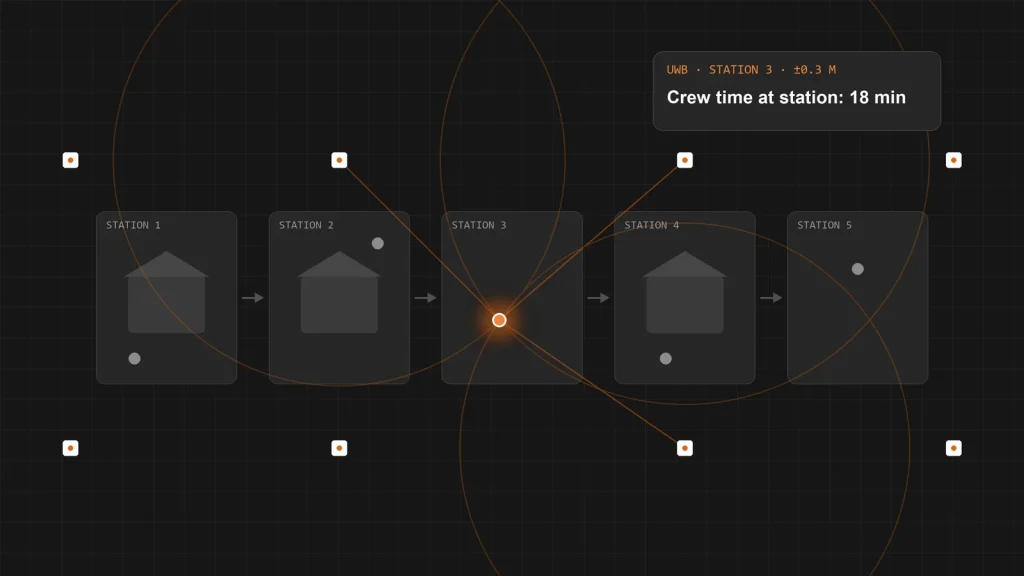
Time at stations, waiting between stations and travel distance, reported by team, zone and shift. Enough to fix a bottleneck or rebalance a line without building a file on any one person.
Workflows this use case improves
Part of InStep’s workforce workflows.
Emergency evacuation
Live muster status by zone, with the people still unaccounted for.
Workflow details
Worker compensation
Billable hours and activity validated by presence and dwell time.
Workflow details
Alerts & reports
The exceptions that matter for safety.
- Red-zone entry
- Unaccounted for at muster
- Lone worker past expected dwell
- Panic and fall alerts
- Forklift–pedestrian proximity
- Worker travel distance
- Productivity & labor utilization
The history is as useful as the alert: repeated proximity events at one intersection tell you where to move a rack or paint a walkway.
Technology fit
The right form factor for each role.
- Smart badgesEveryday presence and zone rules for operators and staff.
- BLE wristbandsContinuous zone presence for people who move between rooms and areas.
- UWB tagsPosition to within tens of centimetres where stations sit close together.
- Hard-hat tagsPlant floors, yards and hazardous zones.
- Mobile (iOS & Android)Check-ins, lone-worker welfare checks and alerts.
Proof
Employee location in production.
Ginosko
Ginosko builds homes in a factory. With HID ultra-wideband tags and anchors feeding InThing, it sees how crews, stations and modules actually flow on the line: time at each station and waiting between stations, by team rather than by individual, how long each module stays in each stage, and restricted-area entries logged automatically for safety. It started as an InThing Lab proof of concept and now runs in daily production.
HID UWBtags and anchors, located to tens of centimetres
Dailyin production, after a Lab proof of concept
By vertical
Where employee safety tracking matters most.
Manufacturing & Logistics
Production lines, warehouses and docks where people and vehicles share space.
Manufacturing & Logistics
Life Sciences & Healthcare
Clean-room presence, sterile zones and GxP audit trails for every operator.
Life Sciences & Healthcare
Questions buyers ask
Employee RTLS FAQ
Does InStep track individual employees all day?
By default, no. Occupancy and productivity are reported by zone, building, floor or workstation. Individual detail is anonymized where appropriate, with role-based anonymization, opt-in workflows and retention controls, and every location event is timestamped and signed so the record can be audited.
What do employees wear?
It depends on the role and the environment: smart badges, BLE wristbands, hard-hat tags, UWB tags or a mobile app on iOS or Android. A clean-room operator and a yard supervisor rarely need the same sensor.
Does it work with our HR, access-control and EHS systems?
Yes. REST APIs and EAI-Bridge connect InStep to HRIS, time-and-attendance, access-control and EHS systems, so presence events and exceptions reach the tools your teams already use.
Related reading
More on workplace safety and RTLS
-
Lab note
Visium AI: ask your operation anything, in plain English
“Where was forklift 01 last seen?” Visium AI answers from your live data, respects every permission and changes nothing without your approval.…
-
Lab note
Evacuation assistance over Bluetooth: knowing everyone is out
We are connecting HID’s BluZone Bluetooth location system to InStep, so presence, mustering and evacuation status come from the badges people already…
-
Lab note
Centimetre-level tracking on Ginosko’s modular construction line
Ginosko builds homes in a factory. With HID ultra-wideband (UWB) tags and anchors feeding InThing, it now sees how crews, stations and…
Part of InStep
One workforce application for every role.
Employees is one of three InStep use cases, alongside temp workers and visitors. All three run on the same InThing platform.
- Related use cases
- Temp workers · Visitors
- Platform
- Trapeze · Visium · EAI-Bridge
See who is on your floor, without surveilling anyone
Bring your hardest safety scenario.
We’ll walk through your zones, roles and muster plan and show which form factor, rules and privacy controls fit.