
InStep · People at work — present, productive, safe.
InStep workforce RTLS and safety software
InStep shows who is in each zone right now, accounts for everyone in an evacuation and flags people in places they shouldn’t be, for operators, contractors, observers and visitors. People have rights and roles that pallets don’t, so privacy is designed in from the first badge.
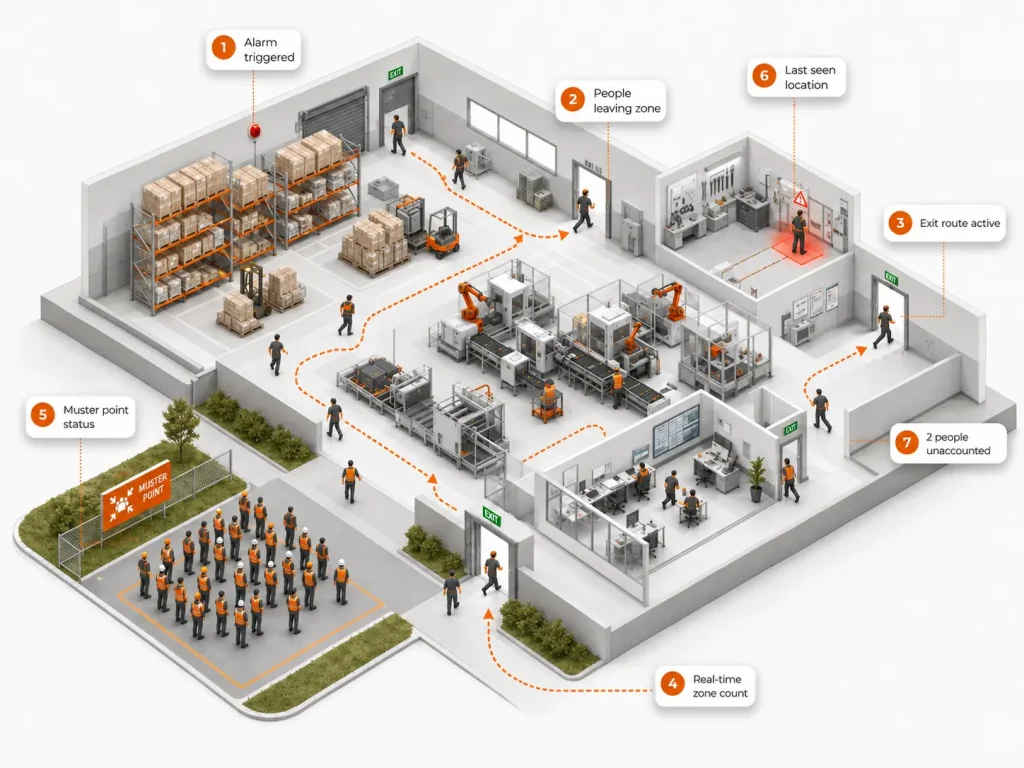
The workforce visibility gap
You track every asset in real time. The people on your floor sign a paper sheet.
Operations have spent a decade digitizing the physical world: assets on RFID, materials on barcodes, machines on IoT. For the people who do the work, most sites still rely on paper sign-in sheets, manual headcounts and badge swipes that can’t say who is where right now.
That gap is expensive. Mustering takes minutes when seconds count. Contractors drift into restricted zones unnoticed. The record of who entered the clean room or the ballot-count room is rebuilt after the fact.
InStep closes the gap between what your HR, EHS and access-control systems believe and what is actually happening on the floor, without turning safety into surveillance.
Who is where?
Real-time presence and occupancy by zone, building, floor or workstation.
Is everyone out?
Live muster status during an evacuation, with the people still unaccounted for.
Should they be here?
Role-based zone rules, escorts and time windows for every kind of worker and visitor.
Can we prove it?
Timestamped, signed location events for auditors, inspectors and regulators.
The power of outcomes
What InStep changes in your operation.
0
unauthorized zone breaches
10 sec
emergency mustering
100%
audit-clean compliance trails
Auto
contractor onboarding
Use cases
Different roles, different rules, one platform.
From the operator on a production line to the credentialed observer in a ballot-count room, InStep knows who someone is, what they are cleared to do and where they are allowed to be.
Employees
Operators, lab technicians, pickers and hospital staff: presence, mustering and safety zones, with productivity measured in aggregate.
Temp workers
Contractors, vendors and seasonal staff: onboarded, escorted, verified at exit and paid on counts both sides can see.
Visitors
Visitors, auditors, inspectors, observers and press: pre-registered, geofenced, time-bounded and checked out automatically.
Workflows
Safety, presence and pay on one real-time location foundation.
Four workflows that turn location into action.
Emergency evacuation
Compare who was in each zone with who has left or reached the muster point, so responders search the areas where people may still be instead of the whole facility.
Occupancy monitoring
Real-time counts of people by zone, building, floor or workstation, for mustering, space utilization and billable hours.
Worker compensation
Credit production counts and billable activity to the worker and station that earned them, shown live, so pay rests on a number both sides can see.
Red zone violations
Geofence machinery, loading areas, hazardous equipment and high-voltage rooms, apply rules by role, and alert when someone enters without clearance.
Alerts & reports
Exceptions, not constant observation.
InStep points to situations outside normal operating conditions, so nobody has to watch every movement.
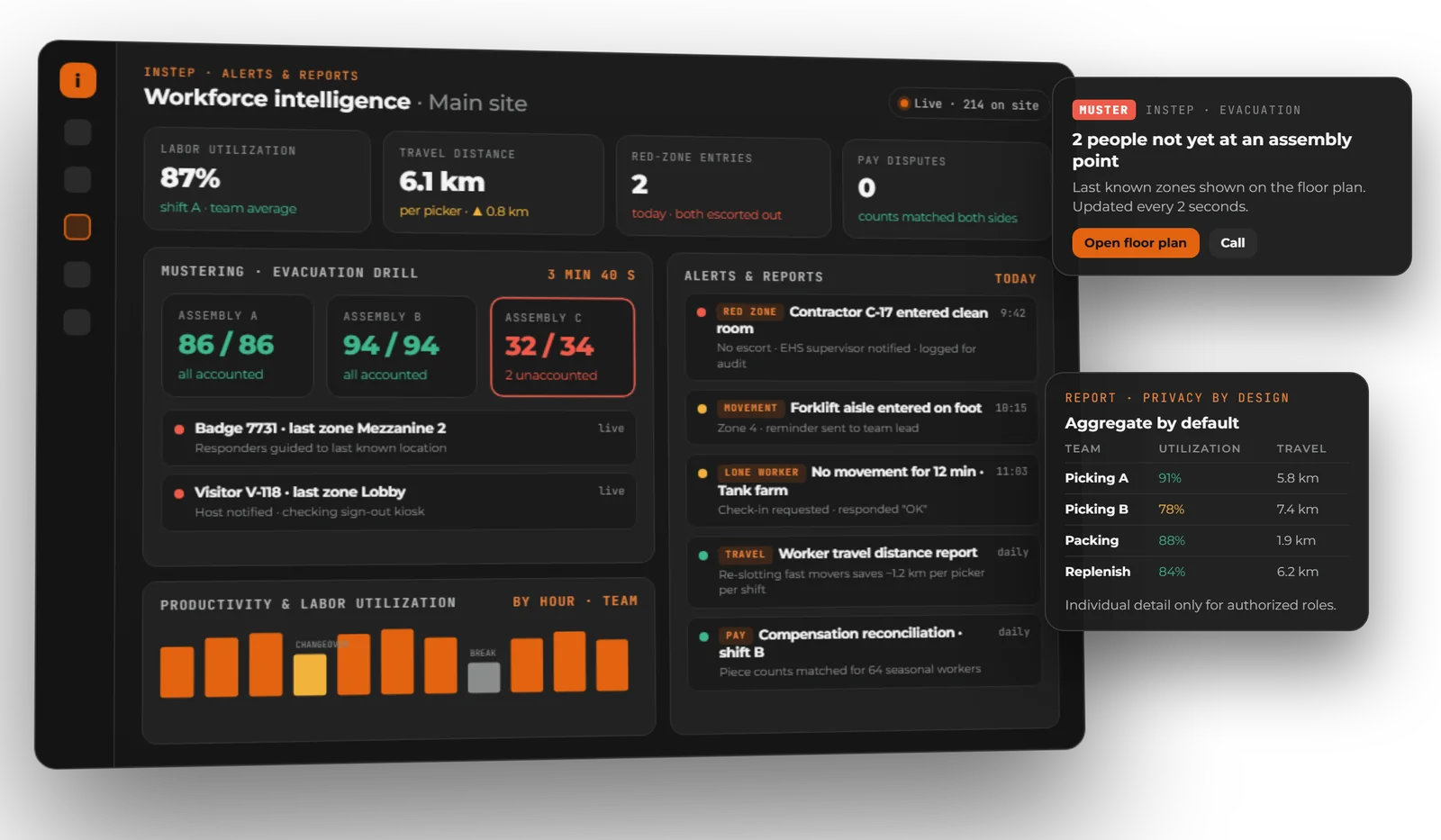
Illustrative example: layout and data show the kind of alerts and reports you get.
- ReportWorker travel distanceDistance walked per role and zone, the basis for smarter slotting and layouts.
- ReportProductivity & labor utilizationTeam-level utilization by hour, shift and area, aggregate by default.
- AlertMustering & movement violationsWho is still inside during an evacuation, and who entered a red zone.
- ReportCompensation reconciliationPiece and time counts that both workers and payroll can trust.
Productivity metrics are aggregate by default, with role-based anonymization and retention controls on individual detail.
What InStep sees
Every role, with its own rights and responsibilities.
Employees & operators
Production workers, plant operators, lab technicians, warehouse pickers and hospital staff: aggregate productivity, billable hours, safety zones.
Employees use case
Contractors & vendors
Service crews, installation teams and maintenance vendors: automated onboarding, escort enforcement, exit verification, badge expiry.
Temp workers use case
Visitors & auditors
Site tours, regulatory inspectors, customer visits and compliance auditors: pre-registered, geofenced, time-bounded access with automatic check-out.
Visitors use case
Lone workers
Solo field crews, night-shift operators and hazardous-zone workers: periodic check-in, panic alerts, fall detection, automated welfare checks.
Employees use case
Authorized observers
Election observers, clinical trial monitors, compliance witnesses and certified inspectors: presence in restricted zones that can be verified and audited.
Visitors use case
Press & credentialed media
Accredited journalists, broadcast crews and photo pools: defined zones, time-windowed access and automatic exit verification.
Visitors use case
Product capabilities
A complete workforce application, built privacy-first.
Ten capability areas around presence, movement, dwell, proximity, productivity and safety.
Presence & occupancy
Real-time count of who is where, by zone, building, floor, asset or workstation.
Movement & path intelligence
Path traces, route adherence and deviation alerts for picking, clinical workflows and security operations.
Dwell-time analysis
Time spent at a location, workstation or asset, or with a patient or client, to find bottlenecks and validate billable activity.
Proximity intelligence
Asset-to-operator association, two-person-rule enforcement and lone-worker safeguards.
Productivity & throughput analytics
Task completions, picks per hour, patient rounds, machine cycles and route completion as aggregate metrics.
Safety & hazard zones
Geofenced restricted areas, no-go enforcement near operating machinery, fall detection, panic button, lone-worker check-ins.
Compliance & audit trails
Every location event timestamped and signed, with chain of custody for clean rooms, ballot rooms and patient rooms.
Contractor
Onboarding, automated check-in and check-out, escort enforcement, badge expiry and exit verification.
Mobile & wearable form factors
iOS and Android, smart badges, BLE wristbands, hard-hat tags, body cameras with location, panic buttons.
Integration & privacy controls
REST APIs to HRIS, time-and-attendance, access control and EHS, plus role-based anonymization, opt-in workflows and retention controls.
Privacy by design
Safety without surveillance.
Workers, unions, works councils and regulators expect privacy to be designed in from day one. InStep is built that way.
- Aggregate by default: occupancy and productivity reported by zone, floor and workstation
- Anonymized where appropriate: role-based anonymization and opt-in workflows
- Auditable always: every location event timestamped and signed
- Retention controls: location history kept only as long as your policy allows
- GDPR- and BIPA-ready privacy controls
- Who sees what
- Role-based access to individual detail
- Consent
- Opt-in workflows where your policy requires them
- Retention
- Configurable retention controls
- Evidence
- Signed, timestamped location events
The right form factor for each role
A clean-room operator and a yard supervisor can’t wear the same sensor.
A contractor on day one and a thirty-year veteran shouldn’t share an onboarding flow either. InStep matches the form factor and the rules to each role and environment.
- Smart badgesEveryday presence, zone rules and check-in for employees, contractors and visitors.
- BLE wristbandsContinuous zone presence for people who move between rooms and areas.
- UWB tagsPosition to within tens of centimetres where stations sit close together.
- Hard-hat tagsPlant floors, yards and hazardous zones.
- RFID badgesLow-cost identity at workstations and gates, and the basis for per-worker production counts.
- Mobile (iOS & Android)Check-ins, lone-worker welfare checks and alerts.
- Panic buttons & body camerasLone-worker and security roles that need an alert or a located record.
Customer stories
InStep in production.
Continental Floral Greens
CFG pays its seasonal wreath makers per wreath. Workers’ RFID badges link them to one of 15 assembly stations, every wreath is counted to that station, shown live on the station display and routed to accept or reject at QA. Pay rests on a count both the worker and the company can see. Delivered with Zebra Technologies and Redline Solutions.
Both sides finally have a number they trust.
The pay-reconciliation problem: a system-of-trust use case
72 hrsmanual reconciliation labor eliminated daily
3-to-0headcount on shift dedicated to pay-tracking audits
Zeropay-reconciliation disputes after rollout
100%accuracy in total wreath count
Ginosko
Ginosko builds homes in a factory. HID ultra-wideband tags and anchors feed InThing, so supervisors see how crews, stations and modules actually flow: time at each station and waiting between stations by team, how long each module spends in each stage, and restricted-area entries logged for safety. It began as an InThing Lab proof of concept and now runs in daily production.
HID UWBtags and anchors, located to tens of centimetres
Dailyin production, after a Lab proof of concept
By vertical
Where workforce RTLS matters most.
Manufacturing & Logistics
Operator presence on production lines, hazard-zone enforcement, OSHA compliance, contractor escort and lone-worker safety.
Manufacturing & Logistics
Government & Education
Authorized and unauthorized presence in ballot-count rooms, evidence rooms and classified zones.
Government & Education
Life Sciences & Healthcare
Clean-room gowning compliance, sterile-zone dwell, two-person rules and code-team mustering.
Life Sciences & Healthcare
How a project runs
From first call to rollout.
- DiagnoseWe walk your zones, roles, muster plan and privacy requirements, and choose the form factor per role.
- Pilot in weeksOne building, one line or one entrance, running against a baseline you agree up front.
- Roll outMore zones and sites, HRIS, access-control and EHS integration through EAI-Bridge, and support from our team. How projects run
Runs on the InThing platform
One platform underneath every product.
InStep runs on the same platform as InVault and InFlow. Trapeze refines raw sensor data into events, Visium delivers them on web, mobile and floor stations, and EAI-Bridge keeps HRIS, time-and-attendance, access-control and EHS systems up to date.
- Integrations
- HRIS, time and attendance, access control, EHS, via REST APIs
- Privacy controls
- Role-based anonymization, opt-in workflows, retention controls
- Deployment
- Single server for pilots, up to high-availability clusters
See who is on your floor, without surveilling anyone
Bring your hardest workforce scenario.
Thirty minutes with us, grounded in your workforce: clean-room compliance, contractor onboarding, lone-worker safety or multi-role zone rules. We’ll suggest the form factor, the workflow and the privacy controls that come with it.